Follow us:

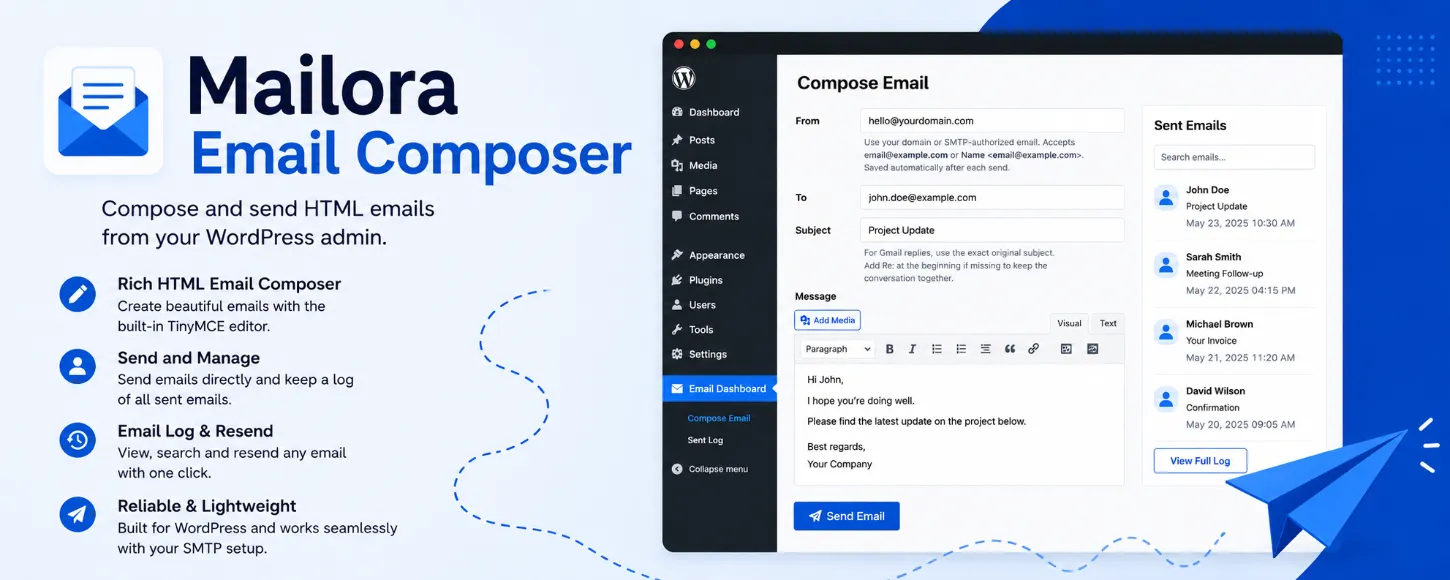
Send HTML emails directly from your WordPress admin dashboard.
Mailora Email Composer is a lightweight email composer plugin that lets you write and send formatted HTML emails from inside WordPress using the familiar TinyMCE editor.
Whether you need to reply to a customer, send a quick business message, test outgoing email functionality, or compose a formatted HTML email without leaving your dashboard, Mailora Email Composer makes the process simple and fast.
Why Mailora Email Composer?
WordPress can already send emails through wp_mail(), but it does not provide a built-in interface for composing and managing emails manually.
Mailora Email Composer fills that gap with a clean, distraction-free interface designed for speed and simplicity.
Instead of switching to a separate email platform or webmail interface, you can compose and send emails directly from your WordPress admin area.
Features
Rich HTML Email Composer
Write beautifully formatted HTML emails using the built-in WordPress TinyMCE editor.
Supports:
- Bold and italic text
- Links
- Lists
- Blockquotes
- Paragraph formatting
- And more
Flexible Sender and Recipient Fields
Supports both formats:
email@example.comand
John Doe <john@example.com>Sent Email Log
Every sent email is stored in a dedicated database table for easy reference.
You can:
- View sent emails
- Search the log instantly
- Delete individual entries
- Clear old records
Send Again
Need to resend or reuse an email?
Open any previous entry and click Send Again to instantly pre-fill the compose form.
Secure HTML Email Viewer
View logged HTML emails safely inside a sandboxed popup window.
Lightweight and Fast
No bloated CRM features, no unnecessary complexity, and no external service dependency.
Mailora Email Composer focuses on one thing: sending emails from WordPress quickly and efficiently.
Compatible with SMTP Plugins
Works with WordPress wp_mail() and compatible SMTP/email delivery services, including:
- WP Mail SMTP
- Postmark
- SendGrid
- Mailgun
- Amazon SES
- SMTP.com
- And most SMTP plugins
Installation
From your WordPress dashboard:
- Go to Plugins → Add New
- Search for “Mailora Email Composer”
- Click Install Now
- Click Activate
Want a step-by-step guide?
See the full tutorial here → How to Send HTML Emails From Your WordPress Dashboard
Who Is This Plugin For?
Mailora Email Composer is useful for:
- Site administrators
- Freelancers
- Agencies
- Developers
- Customer support workflows
- WooCommerce store owners
- Anyone who needs to send emails from WordPress manually
Typical Use Cases
- Send quick customer replies
- Test outgoing email functionality
- Send formatted business emails
- Contact leads directly from WordPress
- Reuse previously sent email templates
- Maintain a searchable email history
Simple Workflow
- Enter your sender email address
- Enter the recipient email address
- Add a subject line
- Compose your HTML email
- Click Send Email
That’s it.
Sent Email Logging
Every outgoing email is automatically logged for future reference.
To keep your database lightweight, Mailora Email Composer automatically retains only the latest 200 entries.
Clean Uninstall
The plugin removes its custom database tables automatically when deleted from WordPress.