Follow us:


Videos are powerful. They boost engagement, help explain your ideas, and keep visitors watching longer. But there’s a major mistake many new WordPress users make: uploading videos directly to their site instead of embedding them from a proper video platform.
While WordPress can host video files, doing so often hurts your site more than it helps. Let’s break down why uploading videos to your WordPress media library isn’t a good idea—and what you should do instead.
Understanding the Difference: Upload vs. Embed
Before we dive in, here’s the key distinction:
- Uploading a video to WordPress means the video file lives on your own server, just like images or PDFs.
- Embedding a video means you upload it to a video platform (like YouTube or Vimeo) and then insert it into your post with a block or embed code.
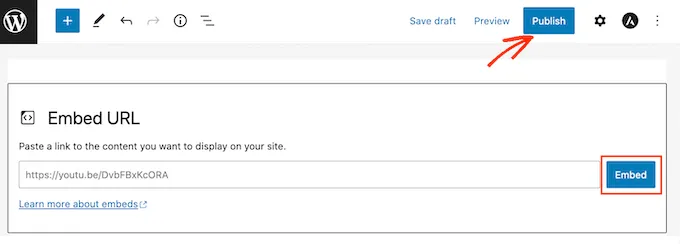
With embedding, your site displays the video, but the heavy work of hosting and streaming happens on the video service’s servers—not your own.
1. Heavy Files = Slow Site Performance
Videos are huge compared to text and images. A high-quality video can easily be tens or hundreds of megabytes. When someone watches that video, your server has to deliver every bit of the file—using your bandwidth, storage, and server resources.
On shared hosting plans (which most WordPress sites start with), this can:
- Slow down your entire site
- Cause long loading times for visitors
- Lead to hosting overage fees or even temporary suspension if limits are exceeded
Simply put: directly uploading video files burdens your hosting setup in ways most small sites aren’t equipped to handle.
2. Poor Video Experience for Visitors
Dedicated video platforms like YouTube or Vimeo use smart streaming technology. They:
✅ Automatically adjust video quality based on each viewer’s internet connection
✅ Serve the best possible playback format for every device
✅ Reduce buffering and improve load speed
WordPress, on the other hand, just delivers your raw file. That means poor playback on slower connections, more buffering, and a less satisfying experience overall.
3. You Miss Out on Free Traffic
Did you know that YouTube is the second largest search engine in the world? Uploading videos there gives your content exposure to millions more viewers than your own site alone—plus powerful discovery features, playlists, and algorithmic recommendations.
Embedding videos from platforms like YouTube or Vimeo can help attract new visitors back to your website.
4. Storage and File Limits Make Uploads Hard
Even before bandwidth becomes an issue, WordPress often limits the size of files you can upload. Many hosting plans restrict uploads to a few dozen megabytes. That means longer, higher-quality videos might not upload at all—no matter how badly you want them on your site.
5. You Gain Extra Features When You Use Video Platforms
Dedicated hosting platforms offer benefits WordPress doesn’t natively provide, such as:
- Custom thumbnails
- Analytics and engagement stats
- Auto-generated captions for accessibility
- Monetization options (like ads on YouTube)
- Tools for video SEO and sharing
These features help your content perform better and reach more people without extra plugins or work on your site.
What to Do Instead: Best Ways to Add Video to WordPress
1. Upload to YouTube (Great for Reach)
YouTube is free, easy to use, and helps new audiences find your videos. After uploading, just paste the video link into your post and WordPress will automatically embed it. Use Vimeo or Wistia as an alternative to YouTube.
2. Use a Video Gallery Plugin
If you want to show multiple videos beautifully on your site, plugins like YouTube galleries let you organize video lists without slowing your page down.
When Maybe You Can Upload a Video Directly
There are rare cases where uploading video might be OK:
- Short background loops (tiny file sizes)
- Internal company sites with controlled audiences
- Sites with powerful hosting and CDN configurations
But for most blogs and business sites, embedding is the smarter choice.
Conclusion: Embedding Wins Every Time
Uploading videos directly to WordPress may seem simple at first, but it quickly becomes a performance and resource problem. By hosting your videos on platforms designed for streaming and embedding them into your posts, you keep your site fast, enjoy better playback for users, and unlock features that accelerate your reach and engagement.