Follow us:

When you’re just starting with WordPress, one of the first confusing crossroads you’ll encounter is this:
What’s the difference between WordPress.com and WordPress.org — and how are they related?
Their names look almost the same, but they serve very different purposes. Yet, they are tied together in a powerful way that has shaped the entire WordPress ecosystem.
In this guide, we’ll walk you through the origin of both platforms, how they interact with each other, and which one is the right choice based on your goals.
The Beginning: The Birth of WordPress.org
WordPress.org started in 2003 as a completely open-source project. It was created by Matt Mullenweg and Mike Little as a better alternative to the older b2/cafelog blogging system.
b2/cafelog was another popular open-source blogging software but it was no longer getting updates, and many users were considering alternatives. One of those users was Matt Mullenweg.
He wrote about the issue on his blog. In the comment section, another user named Mike Little joined the conversation.
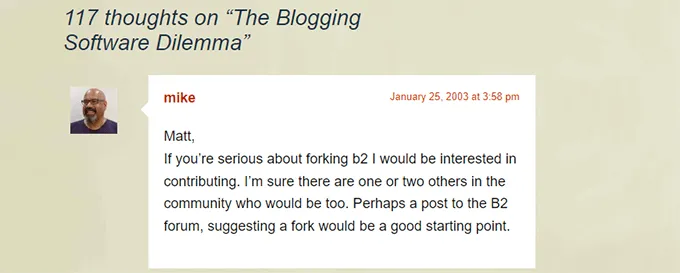
The two of them began working together and released the first version of WordPress on May 27, 2003.
It quickly became a hit among former users of b2/cafelog who started adopting it. Soon, other people began contributing to the development, and that’s how the WordPress.org project started.
What made WordPress.org special was its open-source philosophy — the software is free for anyone to download, use, improve, and share. Developers all around the world can contribute code, translations, support, themes, plugins, and improvements. This collaborative environment helped WordPress become the powerful, flexible platform it is today.
Even though you hear people call it “WordPress.org,” technically the website is just the hub where this software is distributed — the real magic is the software itself that runs websites.
The Arrival of WordPress.com
In 2005, Matt Mullenweg’s company Automattic launched WordPress.com — a hosted service that lets users build a website quickly without worrying about hosting, technical setup, or server maintenance.
Carefully read the footer sentence of the following image:
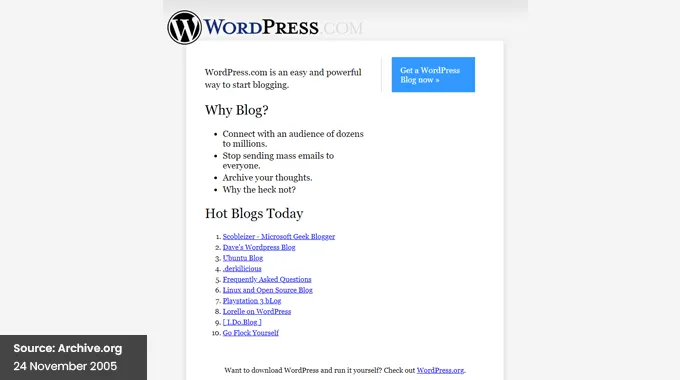
Think of WordPress.com as a ready-to-go website platform. It uses the same core WordPress software as WordPress.org, but it wraps it in a managed, user-friendly environment where everything is handled for you — from security to backups and performance.
However, this convenience comes with certain limitations: you may not have full access to install every plugin or theme, and many advanced features are only available on paid plans.
Who Owns the WordPress Name?
Even though the two platforms are closely linked, neither Automattic nor WordPress.com owns WordPress itself. The WordPress trademark belongs to the non-profit WordPress Foundation, a neutral entity created to protect and preserve WordPress’s open-source nature for everyone.
Automattic originally filed for the WordPress trademark, but later transferred ownership to the Foundation to make sure the name and project couldn’t be controlled by a single company. Today, WordPress.com is licensed to use the WordPress name, but it does not control the project itself.
So, What Is the Relationship?
At their core, WordPress.com and WordPress.org are distinct entities that work in different ways. But they are deeply connected through the WordPress software they both use and contribute to.
Here’s how the relationship works:
WordPress.org
- Provides the free, open-source WordPress software.
- Allows anyone to download and use the code to build a website anywhere.
- Is supported by a vast global community of developers and volunteers.
WordPress.com
- Offers a hosted platform based on that same software.
- Provides a managed website experience where hosting and maintenance are handled for you.
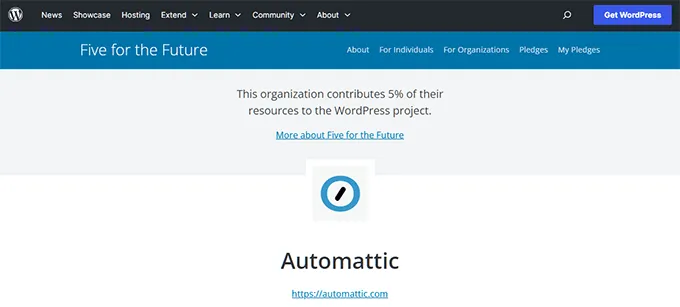
Because WordPress.com is built on WordPress.org, Automattic and its engineers contribute code back to the open-source project — improving the software for everyone. Likewise, WordPress.org benefits from this ongoing development and support.
A Helpful Analogy
A common way to understand the difference is to think of:
- WordPress.org as owning your house — you can remodel it however you want, install any custom feature, and truly make it your own.
- WordPress.com as renting an apartment — you get a space to live, but you’re limited in what you can change unless you pay extra for premium upgrades.
Why the Naming Confusion?
The biggest reason people mix them up is simply the name. Both use “WordPress” and both let you create websites, so beginners often assume they are the same thing.
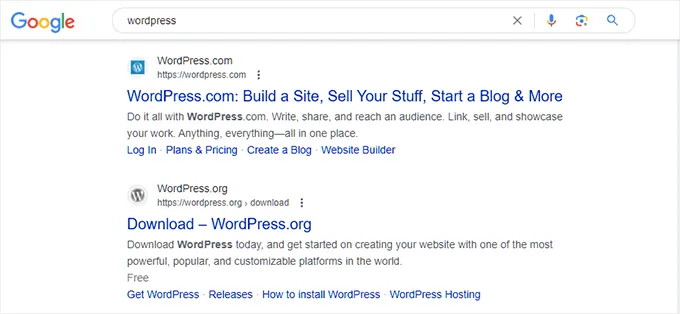
Also, because WordPress.com appears very quickly in search results and uses the WordPress name, users think it represents the entire WordPress project — which isn’t true.
WordPress.org vs WordPress.com: Detailed Comparison Table
Now that you understand how they are connected, let’s look at the practical differences that actually affect your decision.
| Feature | WordPress.org | WordPress.com |
|---|---|---|
| Software Cost | Free | Free (with paid plans for advanced features) |
| Hosting | You must purchase separately | Included |
| Domain Name | Purchase separately | Free subdomain included (paid custom domain) |
| Plugin Installation | Unlimited | Limited to higher-tier plans |
| Theme Customization | Full access to any theme | Limited unless on premium plans |
| Monetization | Full control (ads, affiliate, eCommerce) | Restricted on lower plans |
| Maintenance | You manage updates & security | Managed for you |
| Scalability | Unlimited | Plan-dependent |
| Ownership | Full ownership of site & data | Bound by platform terms |
Let’s break down what this actually means.
Hosting Costs: What You’ll Really Pay
With WordPress.org, the software is free. But you’ll need:
- Domain name (usually yearly cost)
- Web hosting (monthly or yearly cost)
Basic hosting can be affordable, and many providers offer beginner-friendly plans. Over time, you may upgrade hosting as your traffic grows.
With WordPress.com:
- Free plan includes a subdomain (yourname.wordpress.com)
- Paid plans are required for custom domains
- Higher plans unlock plugins, themes, and advanced customization
In many cases, once you choose higher-tier WordPress.com plans, the cost becomes similar to — or even higher than — managed WordPress hosting for WordPress.org.
Feature Limitations: Where the Real Difference Shows
This is where things become serious.
On WordPress.org, you can:
- Install any plugin
- Upload any theme
- Modify code
- Create custom functionality
- Build membership sites
- Launch full eCommerce stores
- Integrate advanced SEO tools
On WordPress.com (especially free or lower plans):
- Plugin installation is restricted
- Custom theme uploads may not be allowed
- Advanced monetization options are limited
- Some features require premium upgrades
So while both use the same core software, the level of control is dramatically different.
Monetization Freedom
If your goal is to make money from your website, this is critical.
With WordPress.org, you can:
- Run any ad network
- Use affiliate marketing
- Sell digital or physical products
- Create online courses
- Build subscription platforms
With WordPress.com:
- Ad options are limited on free plans
- External ad networks may not be allowed
- eCommerce features require higher plans
For business owners or bloggers with long-term goals, WordPress.org offers far more flexibility.
Migration: Can You Switch Later?
Yes — but it’s easier in one direction than the other.
Moving from WordPress.com to WordPress.org is common. Many users start on WordPress.com and later migrate when they need more control.
However:
- Some design elements may need rebuilding
- Certain features may not transfer directly
- You may need to reconfigure plugins and SEO settings
Moving from WordPress.org to WordPress.com is possible but can be more restrictive due to platform limitations.
If you think you’ll need full control eventually, starting with WordPress.org can save time and effort later.
Which One Is Right for You?
Here’s a simplified recommendation guide:
Choose WordPress.org if:
- You’re building a serious blog
- You’re launching a business
- You want full creative and technical control
- You plan to monetize aggressively
- You want long-term scalability
Choose WordPress.com if:
- You want something extremely simple
- You don’t want to manage hosting
- You’re building a personal blog with minimal customization
- You prefer convenience over control
Final Practical Advice for WP Passion Readers
If you’re reading WP Passion, chances are you care about flexibility, plugins, customization, performance optimization, and long-term growth.
In that case, WordPress.org is usually the better choice.
WordPress.com is not “bad.” It’s just built for a different audience — one that prioritizes simplicity over ownership.
Understanding this difference early prevents confusion, wasted money, and unnecessary migrations later.
Summary
- WordPress.org is the open-source foundation everyone can use and build on.
- WordPress.com is a hosted service built on that same foundation.
- They are separate, but both are part of the larger WordPress ecosystem.
- The WordPress name is protected by a non-profit to keep the project free and open for everyone.
Common Myths About WordPress.com vs WordPress.org
Even after understanding the technical differences, many misconceptions still circulate online. Let’s clear up the most common myths that confuse beginners.
Myth 1: WordPress.com and WordPress.org Are the Same Thing
They are not.
They share the same core software, but they are run by different entities and serve different purposes.
WordPress.org provides the open-source software.
WordPress.com is a hosted service built on that software.
They are related — but not identical.
Myth 2: WordPress.com Is the “Official” WordPress
This is a common misunderstanding.
Because WordPress.com uses the WordPress name and often ranks highly in search engines, many assume it is the official or primary version.
In reality, the open-source WordPress project lives at WordPress.org, and that is the foundation of the entire ecosystem.
WordPress.com is simply one company’s commercial implementation of that software.
Myth 3: WordPress.org Is Only for Developers
Not true.
Yes, WordPress.org gives you more technical control. But modern hosting companies provide:
- One-click installations
- Automatic updates
- Beginner-friendly dashboards
You do not need to be a developer to use WordPress.org. Millions of non-technical users run successful websites with it.
The learning curve exists — but it’s manageable.
Myth 4: WordPress.com Is Always Cheaper
At first glance, WordPress.com looks cheaper because it offers a free plan.
But once you need:
- A custom domain
- Plugin installation
- Advanced design options
- eCommerce features
You’ll need higher-tier paid plans.
In many real-world scenarios, self-hosted WordPress.org with quality hosting can cost the same — or even less — while giving you far more flexibility.
Myth 5: You Can’t Move Away From WordPress.com
You can.
Many users start on WordPress.com and later migrate to WordPress.org when they need more control.
The process takes effort, but it’s completely possible.
The key is planning ahead so your content, SEO structure, and domain settings transfer smoothly.
Myth 6: WordPress.org Means You’re On Your Own
Another misunderstanding.
While you are responsible for your hosting and maintenance, WordPress.org has:
- Massive global community support
- Thousands of tutorials
- Extensive documentation
- Active forums
In fact, the support ecosystem around WordPress.org is one of the strongest in the CMS world.
The Bottom Line
The confusion between WordPress.com and WordPress.org isn’t accidental — the names are nearly identical, and both allow you to build websites.
But the philosophy behind each is different.
WordPress.org represents ownership, flexibility, and open-source freedom.
WordPress.com represents convenience, simplicity, and managed infrastructure.
Neither is “wrong.” They simply serve different audiences.
Understanding these myths helps you make a confident, informed decision — instead of discovering limitations after your site is already live.