Follow us:


Many WordPress websites display a “featured” section at the top of the homepage. It’s a common design pattern used by blogs, news sites, and magazine-style websites to highlight important content.
But when it comes to managing that featured section, many site owners make a mistake:
they create a dedicated “Featured” category.
At first, this seems logical. But over time, it creates structural, editorial, and organizational problems that make content management unnecessarily complicated.
A much better approach is to use WordPress’s built-in sticky post functionality.
In this article, we’ll explore why sticky posts are a cleaner and smarter solution than featured category — especially for modern WordPress websites.
What Is a Featured Category?
A featured category is a normal WordPress category created solely for homepage highlighting purposes.
For example:
- Tutorials
- Reviews
- News
- Featured
When a post should appear in the homepage hero section, the site owner manually adds it to the “Featured” category.
While this approach works technically, it introduces several long-term problems.
The Biggest Problem With Featured Category
The core issue is simple:
A category is supposed to represent a topic — not a display behavior.
For example:
- “WordPress Tutorials” is a topic
- “SEO” is a topic
- “Reviews” is a topic
But “Featured” is not a topic.
It’s merely a visual or editorial state.
Using categories for presentation logic mixes content organization with homepage design logic, which creates unnecessary complexity.
Why Sticky Posts Make More Sense
WordPress already includes a built-in feature designed specifically for highlighting important posts:
sticky posts.
Sticky posts were created precisely for this purpose.
Instead of creating artificial categories, you can simply mark a post as “sticky” and let WordPress treat it as featured content.
This keeps your content structure clean and logical.
Sticky Posts Keep Your Categories Organized
One of the biggest advantages of sticky posts is cleaner taxonomy management.
Imagine this scenario:
A tutorial about Gutenberg belongs to:
- Tutorials
- Gutenberg
- WordPress
Now imagine adding:
- Featured
Suddenly, your category system starts mixing topics with homepage behavior.
Over time, this creates bloated archives, confusing navigation structures, and messy editorial workflows.
Sticky posts avoid this entirely because they don’t interfere with your category hierarchy.
The post stays in its proper category while still being highlighted on the homepage.
Sticky Posts Are Built Into WordPress
Another major advantage:
sticky posts are native WordPress functionality.
No hacks.
No workarounds.
No misuse of taxonomy.
WordPress itself already understands:
- how sticky posts behave
- how they should be prioritized
- how themes can display them
That means better compatibility with:
- themes
- query loops
- homepage layouts
- Gutenberg blocks
- magazine-style designs
Modern themes like Blocksy, Kadence, and Astra already work beautifully with sticky posts.
Featured Category Can Create SEO Problems
Many site owners overlook this issue.
When “Featured” is used as a category, WordPress automatically generates:
- category archive pages
- taxonomy URLs
- duplicate organizational structures
This can create thin or unnecessary archive pages such as:
yourwebsite.com/category/featured/
In many cases, these pages offer little SEO value and may even dilute your site structure.
Sticky posts avoid this because they don’t create additional taxonomy archives.
Sticky Posts Are Better for Editorial Workflow
Using sticky posts is also faster and more intuitive for editors.
Instead of:
- remembering to add a category
- removing old featured posts manually
- reorganizing homepage logic
Editors simply:
- Open a post
- Check “Stick to the top of the blog”
Done.
The workflow becomes much cleaner.
The One Problem With Sticky Posts
There is one small issue with WordPress sticky posts by default:
WordPress allows multiple sticky posts.
This can eventually create the same clutter problem you were trying to avoid in the first place.
If multiple editors mark posts as sticky, your homepage hero section may become crowded and inconsistent.
Automatically Manage Sticky Posts the Smart Way
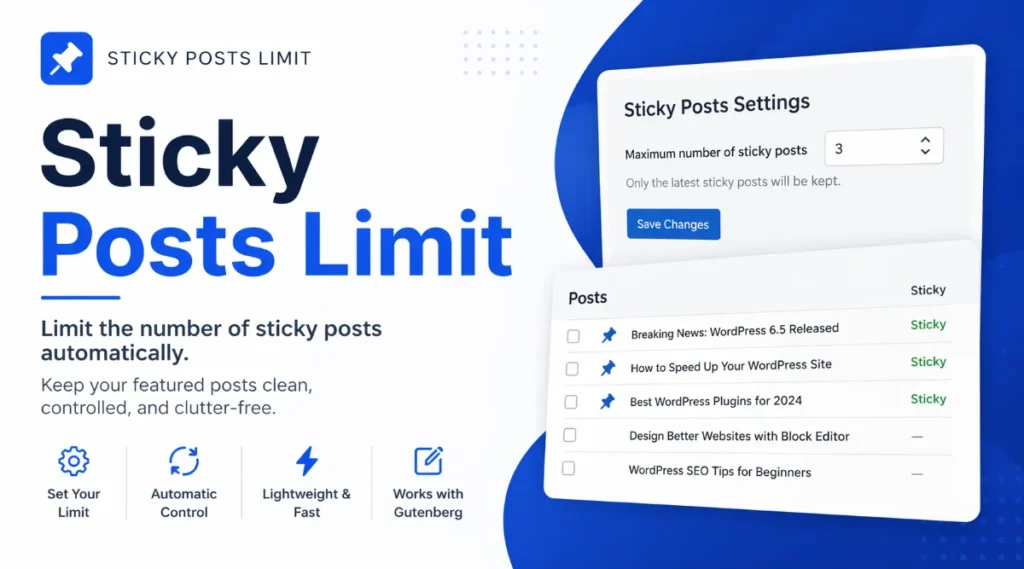
To solve this problem, WP Passion developed a lightweight plugin called:
The plugin automatically ensures that only one sticky post remains active at a time.
When a new post is marked as sticky:
- the previous sticky post is automatically unmarked
- the latest sticky post becomes the featured post
- no manual cleanup is required
This creates a clean and fully automated featured content workflow.
The plugin works with:
- Gutenberg editor
- Classic Editor
- Quick Edit
And because it relies on WordPress’s native sticky post system, it remains lightweight and performance-friendly.
Sticky Posts Work Perfectly With Modern Homepage Builders
Modern WordPress websites increasingly rely on:
- Gutenberg
- Query Loop blocks
- Stackable
- Spectra
- Blocksy content blocks
- Elementor etc.
Sticky posts integrate naturally with these systems.
You can easily:
- display the latest sticky post in a hero section
- exclude it from the main post grid
- build magazine-style layouts
- create responsive homepage designs
Without creating unnecessary categories.
Final Thoughts
Using a “Featured” category may seem convenient initially, but it mixes editorial structure with presentation logic.
Sticky posts are the cleaner and more WordPress-native solution.
They:
- keep categories organized
- improve editorial workflow
- reduce taxonomy clutter
- integrate better with modern themes and builders
- simplify homepage management
And with automation tools like Sticky Posts Limit, you can turn sticky posts into a fully controlled featured content system without any manual maintenance.
For modern WordPress websites, sticky posts simply make more architectural sense than featured category.