Follow us:

XML-RPC is an old communication system built into WordPress that most sites no longer need. Because it has been abused for brute-force attacks, DDoS amplification, and unauthorized login attempts, disabling it is one of the easiest ways to improve WordPress security.
In this guide, you’ll learn simple, reliable methods to disable XML-RPC—whether you prefer editing files, using code snippets, or installing a plugin.
What Is XML-RPC in WordPress?
XML-RPC was originally designed to let external apps publish content or manage your site remotely. But today, WordPress uses the REST API instead, and almost all modern tools rely on it instead of XML-RPC.
Since XML-RPC is outdated and rarely required, leaving it enabled only creates an unnecessary attack surface for hackers. If you aren’t using old-style remote publishing apps, you should disable it.
Method 1: Disable XML-RPC Using .htaccess
This method blocks XML-RPC before it reaches WordPress, making it the most secure and efficient approach.
- Open your site via FTP or your hosting File Manager.
- Edit the
.htaccessfile located in the WordPress root directory. - Add the following code:
<Files xmlrpc.php>
    Order Allow,Deny
    Deny from all
</Files>- Save the file and refresh your site.
Method 2: Disable XML-RPC With a Code Snippet (Recommended)
If you prefer not to edit server files, you can disable XML-RPC from inside WordPress.
Add this code to your child theme’s functions.php file or use a code snippet plugin:
add_filter( 'xmlrpc_enabled', '__return_false' );This completely turns off XML-RPC at the WordPress level. If you use a snippet plugin, the change stays active even if you change themes.
Method 3: Disable XML-RPC With a Plugin (Beginner-Friendly)
If you don’t want to touch any code, a plugin is the easiest option. If you are using a security plugin, chances are that it already has a feature to disable XML-RPC.
For example, if you are using the All-In-One Security (AIOS) plugin, go to AIOS » Firewall and turn on Completely block access to XMLRPC.
If you don’t have any security plugin, follow the instructions below:
- Go to Plugins → Add New
- Search for “Disable XML-RPC-API”
- Navigate to XML-RPC Security » XML-RPC Settings to configure the plugin.
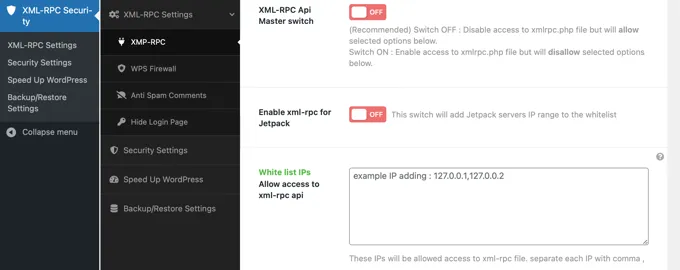
This is the simplest method, but it adds an extra plugin.
How to Check If XML-RPC Is Disabled
You can test the XML-RPC endpoint by visiting:
https://yourdomain.com/xmlrpc.phpIf you see a message like Forbidden, Access Denied, or a similar error, XML-RPC has been successfully blocked.
Final Thoughts
Most modern WordPress websites gain nothing from XML-RPC, and keeping it enabled increases your vulnerability to automated attacks. Whether you prefer editing .htaccess, adding a code snippet, or installing a plugin, disabling XML-RPC is a quick win for WordPress performance and security.