Follow us:


Sticky posts are great—until they aren’t.
At first, they help you highlight important content. But over time, they pile up… and suddenly your homepage is filled with “featured” posts that don’t feel featured anymore.
If you’ve ever thought:
- “Why are there so many sticky posts?”
- “How do I keep only the latest ones?”
- “Do I really have to manually unstick old posts?”
You’re not alone.
In this guide, you’ll learn how to limit sticky posts in WordPress automatically, so your homepage stays clean, focused, and easy to manage.
The Problem with Sticky Posts
By default, WordPress lets you mark unlimited posts as sticky.
That sounds flexible—but it creates problems:
- Your homepage gets cluttered
- Older posts stay “featured” forever
- Managing sticky posts becomes manual work
There’s no built-in way to say:
“Only keep the latest 3 sticky posts.”
What We Want Instead
A smarter system where:
- You define a limit (e.g., 1, 3, 5)
- New sticky posts replace older ones
- Everything happens automatically
No cleanup. No micromanagement.
The Easiest Solution
The simplest way to achieve this is by using the lightweight plugin Sticky Posts Limit.
It does exactly one thing:
👉 Keeps only a defined number of sticky posts—and removes the rest automatically.
Step-by-Step: Limit Sticky Posts in WordPress
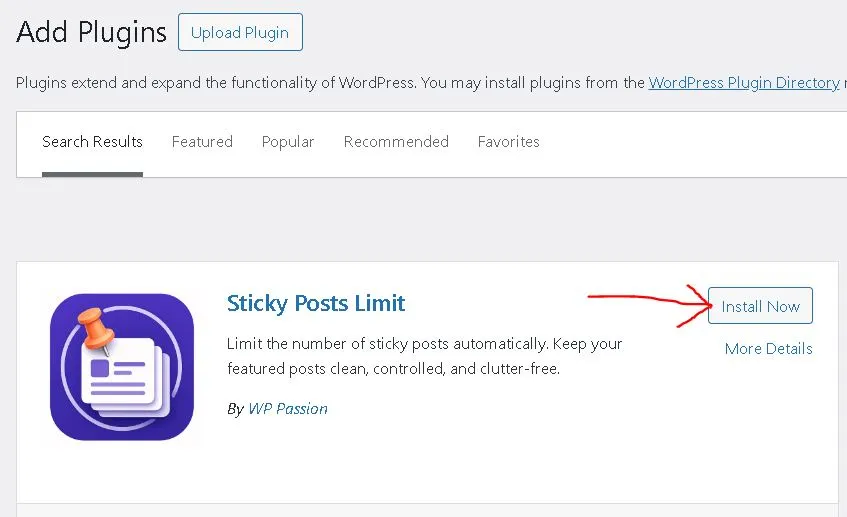
Step 1: Install the Plugin
Go to Plugins → Add New

Search for: Sticky Posts Limit
Click Install → Activate
Step 2: Configure the Limit
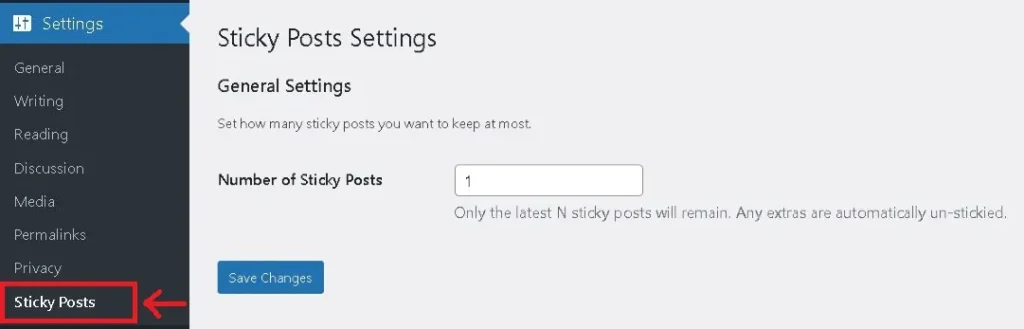
- Go to:
Settings → Sticky Posts- Set your desired number
- Click Save Changes
Step 3: Done
That’s it.
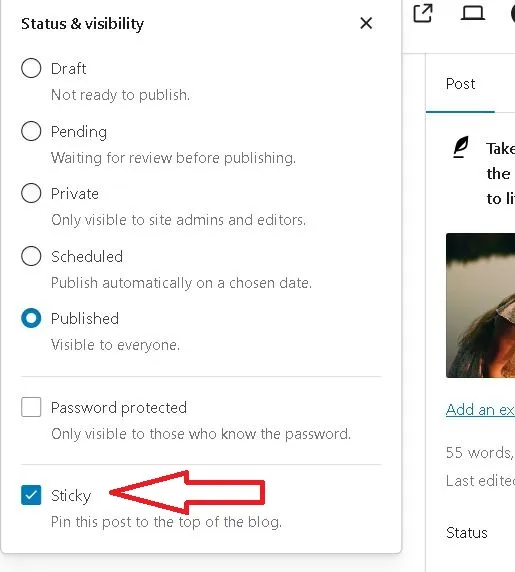
Mark your new post as sticky.
From now on:
- When you mark a new post as sticky
- The plugin automatically removes sticky status from older posts
Your limit is always enforced:

Important Note
If your site already has more sticky posts than your limit:
- Nothing changes immediately
- The limit is applied when you save settings
This prevents unexpected changes.
Example
Let’s say you set the limit to 3:
| Action | Result |
|---|---|
| You have 3 sticky posts | ✅ All stay |
| You add a 4th sticky post | ❌ Oldest one is removed |
| You add another | ❌ Next oldest removed |
Only the latest 3 are always kept.
When Should You Limit Sticky Posts?
This is especially useful if you run:
- Blogs with frequent updates
- News or magazine sites
- Content-heavy homepages
- Sites with multiple authors
Basically, if your sticky posts change often.
Final Thoughts
Sticky posts are meant to highlight content—not overwhelm it.
When everything is “featured,” nothing really stands out.
By limiting sticky posts:
- Your homepage becomes cleaner
- Your content feels more intentional
- Your workflow becomes easier
And the best part?
👉 You set it once—and never think about it again.
Check out the plugin page: Sticky Posts Limit