Follow us:


Let’s dig into a smart way to only show WordPress posts that have a specific custom field filled. Whether you’re building a curated content page or fine-tuning what displays in your archives, this method gives you clean control.
Why Use Custom Field-Based Filtering?
Custom fields let you attach extra metadata—a “color,” “mood,” or any custom descriptor—to your posts.
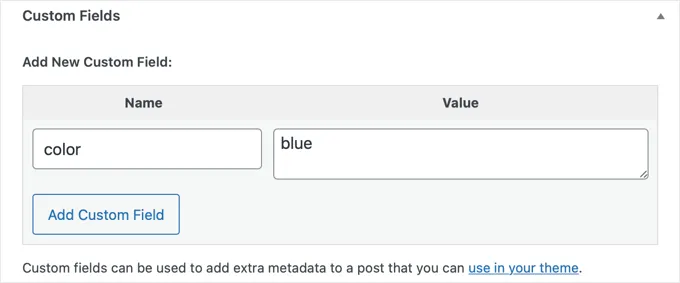
Filtering by these fields is especially handy when you want, for instance:
- To showcase only posts tagged with
"featured"or"gallery" - To create a dynamic archive of posts filled with a certain metadata value
- Or to elegantly trim what appears on specific pages
This method works with both standard posts and custom post types.
⚠️ Caution: This tutorial is not recommended for beginners. It involves editing your theme files directly and requires a basic understanding of PHP and WordPress theme structure. Only proceed if you are comfortable working with code and know what you are doing. Always back up your site or work in a child theme before making changes.
Step 1: Target the Right Theme File
Typically, you’d modify files like index.php, archive.php, or a page template—wherever you’d like to control post output.
Step 2: Replace the Standard Loop with a Custom Query
Normal Loop example in index.php:
if ( have_posts() ) {
  while ( have_posts() ) {
    the_post();
    // display content
  }
}
Swap it with a tailored query to fetch posts that have a particular custom field:
<?php
// Query posts with a specific custom field
$the_query = new WP_Query( 'meta_key=color' );

if ( $the_query->have_posts() ) {
  while ( $the_query->have_posts() ) {
    $the_query->the_post();
    // display your template part or content
  }
  // Add pagination or navigation here if needed
  wp_reset_postdata();
} else {
  // Optionally show "No posts found"
}
?>
Here, only posts that include the color custom field (regardless of its value) will appear.
Step 3: Narrow It Down by Value (Optional)
Want even more precision? Show posts only when color equals "blue":
$the_query = new WP_Query( array(
  'meta_key'   => 'color',
  'meta_value' => 'blue',
) );
That’s it—this fetches only those posts meeting the exact custom field-value pair you want.
Additional Quick Tip: Displaying Custom Fields
The data stored in custom fields won’t display automatically in your posts. To display them, you need to add the following code inside the loop:
if ( get_post_meta( get_the_ID(), 'custom_field_name', true ) ) {
  echo get_post_meta( get_the_ID(), 'custom_field_name', true );
}
This snippet ensures the custom field’s value is displayed only if it’s present.
Wrapping Up
By adding these snippets to your template file, you can fully control which posts appear based on their custom fields. This gives you greater flexibility in structuring your site and ensures only the content you want is shown.